

The 6 Best Preschool Learning Apps for Kids Ages 2 to 6

Type "preschool" into the App Store and you get a wall of bright icons, and almost all of them say they're educational. A few of them teach real skills. Plenty are cartoons with a sticker every thirty seconds, and sorting one from the other after a full workday takes time you don't have.
We picked six great apps for preschoolers, all made for kids ages 2 to 6. Keiki World is our top all-round pick, but each app here suits a different kind of kid. For each app you'll see who it suits, what your kid does in it, and where it comes up short.
Key Takeaways
- Choose by your child's biggest need: broad skills, reading, Montessori, toddler basics, or science.
- Pick an app whose age range includes your child's age today.
- The most useful apps ask your child to solve problems or answer out loud.
- Printables and offline practice help what kids learn in an app stick.
Best Apps for Preschoolers at a Glance
Start with your child's age and what they need most right now. The table shows each app's age range and what it does best.
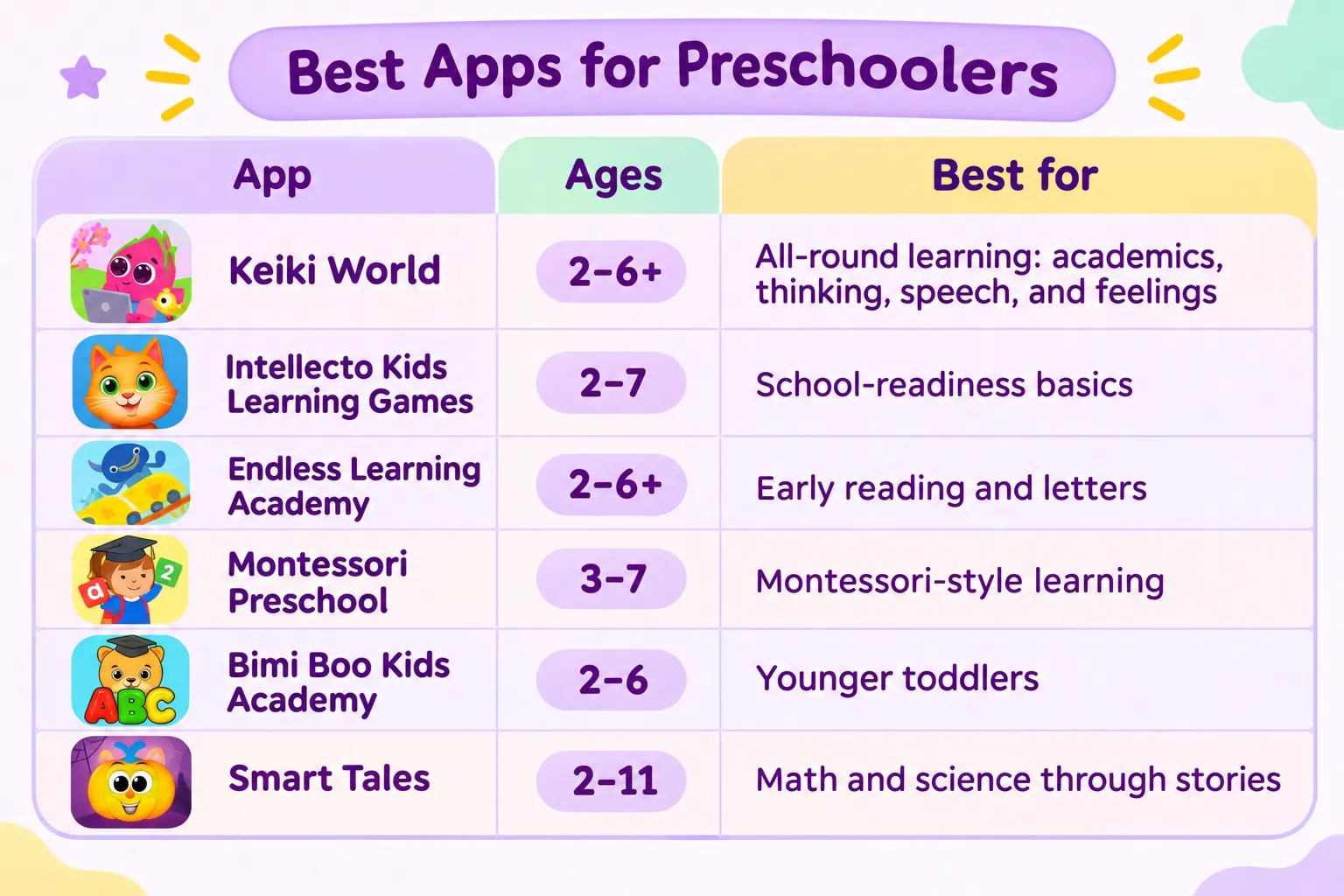
Age ranges come from each developer's App Store page.
1. Intellecto Kids Learning Games: Best for School-Readiness Basics
Intellecto Kids Learning Games is the best pick on this list for school-readiness basics: letters, numbers, tracing, and phonics. IntellectoKids, a smaller studio, made it for kids ages 2 to 7.
Inside Intellecto Kids your kid traces letters and numbers, counts things, sorts colors, and solves short musical puzzles. Rounds are short, so one fits into the few minutes while the pasta's boiling. On the US App Store it sits at 4.3 stars from about 9,700 ratings.
Intellecto Kids sticks close to letters and numbers, so it offers little for creativity, problem-solving, or feelings. Its Google Play listing says the ads go away once you subscribe, so try the free version yourself before handing it over.
- Ages: 2 to 7
- Best for: kids who need steady practice with letters, numbers, and tracing
- Watch for: a narrow academic focus, and a free version that differs from the paid one
2. Keiki World: Best Overall Preschool Learning App
Keiki World is the best app for preschool learning on this list if you want one app that covers a bit of everything. It mixes academics, thinking, feelings, speech, and creativity for kids ages 2 to 6+, and its printables let kids keep practicing away from the screen. Activities are sorted by age, from toddler games to reading readiness.
According to its App Store listing, Keiki World has over 1,500 interactive activities and more than 500 printables. Educators and child-development specialists designed the program around five skill areas:
- Academic Foundations — ABCs, numbers, reading readiness, early math.
- Cognitive Growth — logic, reasoning, problem-solving.
- Social & Emotional — cooperation, empathy, emotional regulation.
- Communication — speech, self-expression, conversation skills.
- Creative Confidence — imagination, flexible thinking, persistence.
Keiki World's preschool learning games mix early academics with thinking and speaking skills. That balance helps if your child is fine with letters but gives up quickly on puzzles, or the other way around.
In Keiki World's ABC Puzzles, your kid drags letters into the right spots, which is letter recognition and phonics in disguise. Trace Letters is handwriting practice set in outer space. In the talking-buddy games, your child answers out loud, so they practice saying new words themselves.
Keiki World works best in short daily sessions. A simple routine: one or two games after breakfast, then a matching worksheet at the kitchen table later in the day. The app has no ads and holds a 4.6 average across more than 93,000 App Store ratings.
- Ages: 2 to 6+
- Best for: parents who want one app that covers many preschool skills, with offline practice too
- Stands out for: a wide mix of skills, printables for offline practice, and speech games
- Watch for: it's built for ages 2 to 6+, so kids in early grade school may outgrow it

Help your child
grow with Keiki
We’ll help you turn everyday screen time
into real learning progress.
3. Endless Learning Academy: Best for Early Reading and Letters
Endless Learning Academy is the best pick on this list for a kid who loves letters and words. It's from Originator, the small studio that made Endless Alphabet, and it's meant for ages 2 to 6+. Lessons cover ABCs, phonics, vocabulary, spelling, handwriting, and early reading, with numbers, emotions, music, Spanish, and art mixed in.
In Endless Learning Academy, a gang of friendly monsters walks your kid through each lesson. There are video lessons too, on things like time, size, and direction. The app has no high scores or fail screens, so kids learn at their own speed.
If you're not sure your child is ready for letters, our guide on when kids learn their ABCs runs through what's normal at each age.
Endless Learning Academy has a 7-day free trial and a stripped-down version for non-subscribers, and after that you pick a monthly, yearly, or lifetime plan. The app is English only and needs to go online now and then to check your subscription. Reading is its strongest area, so logic and social skills get less time.
- Ages: 2 to 6+
- Best for: kids drawn to letters, words, and early reading
- Watch for: English only, and a lighter focus on thinking and social skills
4. Montessori Preschool: Best for Montessori-Minded Families
Montessori Preschool is the best pick on this list for families who already follow Montessori, at home or at school. Edoki Academy, a studio based in Paris, built it with over 1,000 activities that certified Montessori teachers designed for ages 3 to 7. It covers reading, math, science, coding, art, and music.
Montessori Preschool follows the Montessori order of learning. Kids play with letter sounds before they read whole words, and they use digital versions of Montessori materials to try some simple adding and taking away. Younger kids get sing-alongs and lessons on colors and shapes. A parent dashboard shows what your kid has been learning, and parent controls set how long they can play.
Montessori Preschool starts at 3, so a 2-year-old won't get much out of it yet. It's also on the pricey side, with US plans at $9.99 a month or $59.99 a year. Montessori Preschool comes in eight languages, including English, Spanish, French, and German, which helps bilingual families.
- Ages: 3 to 7
- Best for: families who want Montessori methods on the tablet
- Watch for: little for 2-year-olds, and a higher subscription price
5. Bimi Boo Kids Academy: Best for Younger Toddlers
Bimi Boo Kids Academy is the best pick on this list for the youngest preschoolers, the 2- and 3-year-olds still figuring out tapping and dragging. The App Store lists it as Kids & Toddlers Learning Game. It has over 1,700 activities for ages 2 to 6: puzzles, coloring, tracing, drawing, sorting, flashcards, videos, and songs.
Bimi Boo Kids Academy lets your kid either follow a learning path, where a little story links the games, or pick any game they like. One account holds up to three child profiles, and a parent section shows how each kid's doing. There are no ads and no links out of the app.
Bimi Boo Kids Academy needs internet to sync progress, which makes it less useful on a plane or in the back seat on a long drive. In the US it's listed at $6.99 a month or $59.99 a year.
- Ages: 2 to 6
- Best for: toddlers starting with their first learning games
- Watch for: needs internet to sync progress
6. Smart Tales: Best for Math and Science Through Stories
Smart Tales is the best pick on this list for a kid who loves stories and asks why about everything. Marshmallow Games, a small studio, made it for ages 2 to 11, with over 2,500 activities in reading, math, and science. For preschoolers, math stays with counting and shapes.
In Smart Tales your preschooler learns animal facts and tries easy experiments in a pretend science lab. Each child gets a personal learning path, with progress in a Parent Area. Smart Tales works offline and is rated 4.6 from about 18,000 App Store ratings. Its listing also says it's certified for kids on the autism spectrum.
Since Smart Tales goes all the way up to age 11, much of the app is school-age content your preschooler won't use yet. Common Sense Media's review also called the main menu a bit confusing, with the same content popping up in a few places. Sit with your kid for the first few sessions so they can find the preschool section.
- Ages: 2 to 11
- Best for: curious kids who learn best through stories
- Watch for: lots of content for older kids, and a busy menu
How to Choose Learning Apps for Preschoolers
A good preschool app fits your child's age, makes them think, and connects back to real life. These four questions will narrow this list to one or two apps.
Does it fit your child's age right now?
A preschool app is a good fit if your child's age falls within its listed range. Two-year-olds need simple tap-and-drag games with clear sounds and pictures. Four-year-olds are usually ready for letter sounds and counting. By 6, lots of kids can read short words.
An app made for one stage tends to feel too easy or too hard at another, so compare the listed ages with what your kid can do now.
Does your child think, or only tap?
The best preschool apps make your kid work something out, like building a word, finishing a pattern, or answering out loud. The weaker ones throw a sound and a sticker at every tap. Watch over their shoulder for five minutes. If they tap at random and still win, the app isn't teaching much.
How long does a session last?
Preschool app sessions should be short and end at a natural break, like the end of a lesson. Apps built around daily lessons make that easy, since you don't have to stop your kid halfway through a level.
What happens after the screen turns off?
Skills from a preschool app stick when your kid uses them in real life. Apps that come with printables, worksheets, or offline activity ideas let them practice the same letters and numbers away from the tablet. Also check for ads, because ads pull a young child's attention off the lesson.
Help your child thrive with playful learning
Turn screen time into real growth with Keiki's educational games.
Try KeikiHow to Get More Out of Any Preschool App
A preschool app gives your child practice, but you're the one who connects it to everyday life. These four habits work with any app on this list and take a few minutes a day.
- Ask about what they played. Something like "What letter did you find today?" gets your child retelling the lesson in their own words.
- Point out the same skill at home. If they counted apples in an app, count the apples in the fruit bowl together.
- Play together for the first few sessions. You'll learn how the app works and spot anything that frustrates your child.
- Keep sessions at the same time each day. A short, predictable slot, like after breakfast, cuts down on arguments about screen time.


